If you want 5G internet for a home office, shop, or small multi-site business, UniFi 5G Max is a good modem because it combines managed UniFi integration, dual SIM/eSIM support, PoE power, and carrier flexibility. It is designed to provide a cellular WAN connection that you can monitor, prioritize, and use for failover – not simply act as a standalone plug-in router.
The Outdoor model lists an uplink of 560 Mbps and a downlink of 1.8 Gbps. UniFi 5G Max also supports remote deployments, and its Outdoor version is built for pole or wall mounting. Those features make it useful as either a primary WAN connection or a backup for an existing wired service.
Its main value is control rather than speed alone. You can adopt it through UniFi, connect it to routing policies and VLANs, use two cellular identities for redundancy, and power the Outdoor model over PoE. That gives you a more predictable way to manage cellular connectivity when a wired WAN becomes unreliable.
Key Takeaways
- UniFi adoption is central. The modem is designed to be adopted through UniFi, so setup and monitoring stay in the same management system.
- Dual SIM/eSIM adds flexibility. Two cellular identities can support carrier redundancy and failover.
- PoE simplifies installation. The Outdoor version can receive power through the network cable, which helps with pole, roofline, and exterior-wall installations.
- The Outdoor model is built for exposure. It is rated IPX6/IP67 when used with the cable-gland door kit.
- Carrier eligibility still needs checking. Certification with major US carriers does not mean every plan or SIM is supported.
- Speed depends on the installation. Antenna behavior, placement, tower congestion, and UniFi WAN policies all affect the result.
What UniFi 5G Max Is Built to Do
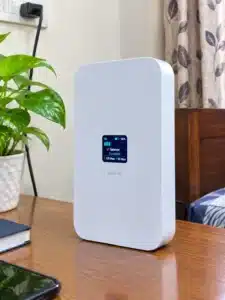
UniFi 5G Max is a cellular WAN modem designed to work inside the UniFi ecosystem. It handles cellular connectivity while your UniFi gateway, console, or controller manages routing, VLANs, WAN policies, and failover. If you already run UniFi gateways, switches, or a UniFi Cloud Gateway, that integration is the main reason to choose it over a generic cellular router.
With dual SIM/eSIM support, you can maintain two cellular paths and respond more effectively when one carrier becomes congested or loses coverage. That makes the modem a better fit for hospitality, rural offices, construction sites, and other locations where an internet outage has operational consequences.
The Outdoor model adds installation flexibility. It is rated IPX6 and IP67 when used with the cable-gland door kit, and it includes hardware for pole or wall mounting. The unit weighs 1.2 kg (2.6 lb), uses a weather-ready enclosure, and lists an uplink of 560 Mbps and a downlink of 1.8 Gbps.
UniFi 5G Max is not a simple modem that you power on and manage independently. It is better understood as managed cellular transport for a UniFi network. Before buying, confirm that your existing or planned UniFi equipment can adopt and manage it.
Why UniFi 5G Max Works Well as a Managed WAN
UniFi 5G Max combines four useful features: UniFi-managed adoption, dual SIM/eSIM redundancy, PoE-friendly power, and published performance targets. For an installation where uptime matters, those features are more useful than a speed claim without a management plan.
The adoption process keeps the modem in the same operational workflow as the rest of your UniFi network. The modem is designed to be instantly adopted through UniFi PoE ports, which can reduce the separate firmware, interface, and monitoring tasks that come with a generic cellular router. When a failure occurs, you can manage the cellular connection alongside your other network equipment instead of opening a separate console.
At a US installation, two cellular identities may let you choose carriers based on coverage at the property rather than relying on a single provider. It does not guarantee that both carriers will perform equally well, so signal conditions still need to be checked.
PoE affects where you can install the modem. You can place the Outdoor unit near a better signal source without finding a dedicated AC outlet at the roofline, pole, or exterior wall. That can produce a cleaner cable run and a better cellular connection.
The Outdoor model’s directional antennas and published uplink/downlink targets also help with capacity planning. Actual speeds may be lower because of signal quality, tower distance, and congestion, but the specifications provide a useful reference when deciding whether 5G can support primary WAN service, voice and video calls, or business workloads.
Installation and Carrier Checks That Prevent Problems
Poor placement, an incompatible cellular plan, and the wrong expectations about UniFi integration cause most avoidable problems. Check all three before relying on UniFi 5G Max for business connectivity.
Place the modem for signal quality
Treat cellular placement as an RF decision, not a Wi-Fi decision. Mount the Outdoor unit higher and away from metal obstructions when possible. If the installation uses directional antenna behavior, adjust the unit carefully rather than assuming that any exterior location will perform well.
A few feet or a small change in angle can affect signal quality, throughput, and latency consistency. Check the connection at the planned mounting location before finalizing cable routes or permanent hardware.
After adoption, verify WAN health and failover in UniFi. Confirm that the modem is included in the correct WAN policies and that VLANs, routing rules, alerts, and client behavior remain correct during a simulated carrier disruption. A modem that connects successfully is not enough; the network must also respond correctly when the primary path fails.
Match the SIM to the carrier plan
Check the plan type before inserting a SIM. The store information specifies that a data-only plan is required and that T-Mobile Home Internet SIMs aren’t supported. A carrier can approve the hardware while still restricting particular plan types.
Carrier certification also does not mean that every plan behaves the same way. The certification notes include Verizon business fixed 5G/gateway data plans, so match your service to the intended use case instead of assuming that a consumer plan will work.
Document the WAN setup
Record which SIM is primary, what triggers failover, where alerts appear, and which UniFi policies use the cellular connection. That documentation matters when someone has to support the installation months later or when the modem moves to another site.
Benefits of UniFi 5G Max for Business and Remote Sites
UniFi 5G Max is most useful when you want managed networking, redundancy, and flexible placement rather than an all-in-one consumer router. If you already use UniFi, cellular becomes another WAN input in the same management system instead of a separate device with its own operating habits.
Tower congestion, local interference, or coverage changes can weaken a single carrier path. A second cellular identity gives you another route when the primary connection degrades. It cannot overcome poor coverage from both carriers, but it gives you more options than a single-SIM modem.
The Outdoor model’s environmental protection also matters for permanent installations. Its IPX6 and IP67 ratings, when used with the cable-gland door kit, help protect against rain, washdowns, dust intrusion, and harsh seasonal conditions. If the modem will remain outside, the Outdoor model is a safer choice than improvising an enclosure around an indoor device.
UniFi routing policies and SLAs give you control over how the connection is used. You can decide when 5G acts as a backup, how traffic is distributed, and whether particular clients or VLANs use the cellular path. That level of control makes cellular more practical as a business WAN than a connection that simply turns on when another router loses service.
Choosing Between the UniFi 5G Max Models
The main hardware decision is whether the modem will operate indoors or outdoors. Choose the standard UniFi 5G Max for a controlled or sheltered installation. Choose the UniFi 5G Max Outdoor when the modem needs exterior mounting, directional antenna behavior, and weather protection.
The standard UniFi 5G Max is suited to indoor deployments or locations where exposure is limited. It is designed for UniFi adoption and dual SIM/eSIM support, which makes it a practical option when the modem can remain inside and still receive an adequate signal.
The UniFi 5G Max Outdoor is intended for pole or wall mounting. It provides IPX6/IP67-rated protection with the cable-gland door kit, weighs 1.2 kg, and lists a 560 Mbps uplink and 1.8 Gbps downlink. It also uses PoE input and supports a nano-SIM or eSIM.
| Model | Best for | Key spec notes | Where it simplifies installs |
|---|---|---|---|
| UniFi 5G Max | Indoor or sheltered deployments | Designed for UniFi adoption and dual SIM/eSIM | Uses UniFi PoE adoption for easier setup |
| UniFi 5G Max Outdoor | Outdoor pole/wall mounting | IPX6/IP67 (with cable-gland door kit), 1.2 kg, published uplink 560 Mbps, downlink 1.8 Gbps | PoE input plus weatherproof housing |
Both models make the most sense when you already have, or plan to install, UniFi consoles or gateways that can manage WAN behavior. If you want a completely self-contained router with its own management interface, a standalone 5G router may suit you better.
How to Plan a Reliable UniFi 5G Max Deployment
Design the installation around verification rather than assuming the connection will work perfectly after adoption. UniFi 5G Max is part of a larger system, so the plan should cover adoption, monitoring, carrier selection, failover, and ongoing costs.
Test the system during installation. After adoption, force a failover scenario or switch the active SIM if your policy supports it. Watch routing, latency-sensitive traffic, VLAN-specific behavior, alerts, and recovery when the primary connection returns. This test reveals problems before the modem supports critical services.
Two SIMs help only when at least one carrier provides usable service at the site. Check signal quality at the planned mounting location and avoid assuming that the second carrier will automatically perform better.
Budget for monthly service as well as operational overhead. Cellular usage can vary sharply when users treat 5G like unlimited wired internet. Use per-SIM usage limits or similar controls where available to reduce the risk of unexpected charges.
Where UniFi 5G Max Makes Sense
UniFi 5G Max solves three common WAN problems: unreliable primary internet, connectivity at remote locations, and the need to apply different policies to multiple clients or VLANs.
A small hotel with one wired provider that slows or drops during peak hours could use 5G as a backup WAN through UniFi routing policies. Dual SIM support reduces dependence on one carrier. In that setup, the value is continuity for check-in systems, point-of-sale traffic, and guest Wi-Fi rather than maximum download speed alone.
A rural office with no convenient landline options could mount the Outdoor unit on a pole and use PoE to avoid running AC power to the installation point. Once adopted, the administrator can monitor WAN health and test failover without asking staff to troubleshoot a separate cellular router.
A contractor site that changes locations benefits from the Outdoor model’s mounting approach and weatherproof enclosure. The hardware can move with the site while the UniFi network configuration remains consistent. Carrier performance still needs to be checked at every new location.
A small IT team managing several offices can use the same UniFi workflow for cellular connectivity at each site. Consistent adoption, monitoring, and failover policies reduce the management differences that often turn backup internet into a recurring support problem.
FAQ
Is UniFi 5G Max a standalone router or a modem?
UniFi 5G Max is designed to integrate with UniFi consoles or Cloud Gateways rather than operate as a typical standalone home router. It provides cellular connectivity to the UniFi network, where routing policies determine how that connection is used.
What network speeds can I expect from UniFi 5G Max?
The Outdoor model lists an uplink of 560 Mbps and a downlink of 1.8 Gbps. The standard UniFi 5G Max is described as a high-performance 5G modem with published targets as part of the product lineup. Actual speeds depend on tower distance, congestion, signal quality, and placement, so use those figures as planning references rather than guarantees.
How much does UniFi 5G Max cost, and how much is the monthly data?
The exact price depends on the current retailer and promotions. Monthly cost depends on your carrier plan, data allowance, and usage. Dual SIM/eSIM support and per-SIM controls can help manage usage and reduce overage surprises. If you plan to use 5G as the primary WAN, budget for the higher data consumption that usually comes with that role.
What is the biggest safety or reliability mistake people make?
The most common mistake is pairing the hardware with the wrong SIM or plan type. The product notes specify that a data-only plan is required and that certain T-Mobile Home Internet SIMs are not supported. Another mistake is skipping installation tests and assuming that failover, routing, and alerts will work without verification.
What is a common alternative to UniFi 5G Max?
A common alternative is a standalone 5G router from a non-UniFi vendor that you manage through its own web interface. That approach can be simpler if you want an independent device, but it does not provide the same UniFi-based routing policy control and centralized monitoring. If you already use UniFi switches and gateways, UniFi 5G Max is usually the cleaner operational fit.
UniFi 5G Max is best treated as a UniFi-managed cellular WAN option, not a generic plug-in 5G router. If you already use UniFi and need failover, choose the Outdoor model for exposed installations, confirm that your carrier plan is supported, and run a failover test before relying on the connection.