When decorating your home, routers and modems are probably the last things you want sitting out in the open. You can spend hours arranging furniture, choosing the perfect decorations, and making everything look beautiful, only for a router with blinking lights and messy cables to ruin the whole setup.
But let’s face it. You can’t really live without these devices anymore. Whether you’re working from home, streaming movies, or simply scrolling through your phone, a reliable internet connection has become essential.
Fortunately, you don’t have to sacrifice your home’s aesthetics to keep your Wi-Fi running smoothly. Knowing how to hide a router and modem without blocking the signal takes a little creativity and some basic understanding of how Wi-Fi works. You can’t just throw your router into a random box and expect everything to work perfectly.
There are plenty of clever ways to hide these devices while keeping them accessible and properly ventilated. So, let’s go through some practical ideas that’ll help you get rid of that electronic clutter without creating internet problems.
How to Hide Router and Modem Without Blocking Signal: Tips & Tricks
The first thing that might come to your mind is hiding your router behind furniture or placing it inside a cabinet. While these ideas sound convenient, they aren’t always the best for Wi-Fi performance.
Your router needs an open space to distribute wireless signals effectively. Thick walls, metal objects, and enclosed furniture can weaken those signals, particularly on higher-frequency Wi-Fi bands.
That doesn’t mean hiding your router is impossible. The easiest way to hide a router without noticeably affecting Wi-Fi is to use an open shelf, a ventilated router organizer, or decorative furniture that doesn’t surround the device with thick materials.
Also, remember that your modem and router may be two separate devices. A modem that doesn’t broadcast Wi-Fi gives you more flexibility in where you place it, but it still needs proper ventilation. With that out of the way, here are my favorite ideas for hiding routers and modems around the house.
1. Get a Wi-Fi Router Box or Cable Organizer Box
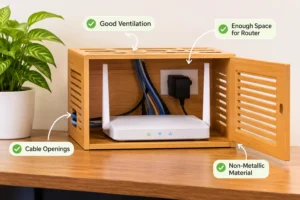
A Wi-Fi router box is probably one of the most convenient ways to hide your internet equipment without making your living room look cluttered.
These organizers are specifically designed to hold routers, modems, and their cables. Some can be mounted on walls, while others sit comfortably on desks, shelves, or TV consoles.
You’ll find them in different styles, including wooden organizers, lightweight plastic covers, and decorative wall-mounted boxes.
What I like about these boxes is that they solve two problems at once. They help conceal the device and give all those tangled cables a designated place.
However, there’s something important to keep in mind. Not every router box is suitable for wireless equipment. Some decorative boxes are completely enclosed, which can interfere with signals or trap heat.
Choose an organizer that has:
-
Large ventilation openings.
-
Enough space around the device.
-
Openings for power and Ethernet cables.
-
Non-metallic materials that don’t heavily obstruct Wi-Fi.
Avoid stuffing the router and its power adapter into a tiny compartment. A well-designed router organizer can be a great addition to your setup, but I’d still recommend checking your Wi-Fi performance after placing the device inside.
2. Mount a Shelf on the Wall
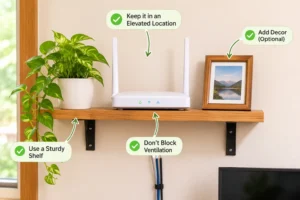
If you don’t want to spend money on a special router box, installing a small wall shelf is another excellent option. The idea is simple. Instead of keeping your router on a crowded table where everyone can see it, move it onto a shelf that blends naturally with your room’s decoration.
A floating wooden shelf works particularly well because it doesn’t completely surround the router. You can also place a small photo frame or decorative object nearby to make the arrangement look intentional.
One thing I’d avoid is mounting the shelf too close to the ceiling or hiding it in a distant corner just to keep the device out of sight. For better Wi-Fi coverage, routers generally work best in an elevated, relatively central location with fewer obstacles.
You don’t need to be an expert at DIY projects to install a small shelf. A few brackets, screws, and basic tools should get the job done. Just make sure the shelf is strong enough to support your equipment, and don’t block the router’s ventilation openings.
3. Hide It Among Other Household Items
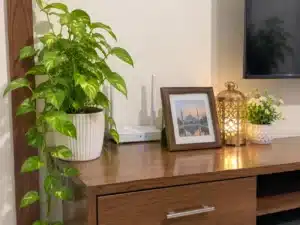
Sometimes, the easiest solution is already sitting somewhere in your living room. You don’t necessarily need a special box or expensive furniture to hide your router. A little rearranging can make a surprisingly big difference.
Look around your home. You’ll probably find a console table, bookshelf, or decorative corner where your router could blend in with other household items. For example, you can place the device behind a small picture frame or beside a decorative vase. The trick is to hide it from your direct line of sight rather than completely covering it. If you’re using a console table, try positioning the router toward the back while leaving enough open space around it. Photo frames, artificial plants, and decorative accessories can help distract attention from the device without turning it into the center of the room.
However, avoid placing large metal decorations directly in front of the router. I also wouldn’t recommend covering the router with a table runner or fabric. It might make everything look tidy, but it can block ventilation and cause unnecessary heat buildup. For me, this method works best when you want to hide the router without making any permanent changes to your furniture.
4. Try the Empty Book Trick

If you enjoy creative DIY projects, the book trick is definitely worth considering. The idea is to make your router look like part of a collection of books on your bookshelf.
Traditionally, this involves cutting out the inside of a hardcover book and placing the device inside. It sounds clever, doesn’t it? But there’s a catch. A router sitting inside a tightly enclosed book won’t have much room to release heat. Depending on the book’s construction and the router’s design, the surrounding materials may also affect signal strength.
That’s why I’d suggest a slightly different approach. Instead of putting the router inside an actual book, create a decorative book-spine cover that sits in front of it. You can use old book covers, lightweight cardboard, or a ready-made faux-book decoration. Keep the back and top of the arrangement open so air can circulate freely. Once it’s positioned on a bookshelf, it’ll look like an ordinary collection of books.
The router remains hidden from view, but you can still access its cables and indicator lights whenever necessary. If you’re interested in building something similar, this DIY video tutorial may give you a few ideas. Just remember that the goal is to disguise the router, not seal it inside a book.
5. Put It in a Decorative Box or Woven Basket
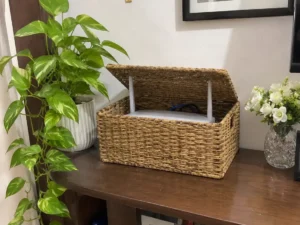
Woven baskets are one of those household items that seem to work almost anywhere. They’re great for storing small accessories, organizing shelves, and, with the right setup, concealing electronic devices.
If you want a simple way to hide your modem or router, a loosely woven basket might be exactly what you need. Unlike a tightly sealed container, a basket with generous openings allows air to move around the equipment. You can place it on a side table, media console, or open shelf and run the cables through the back. It also looks much more natural than having a black router sitting next to your decorative accessories.
However, don’t assume every woven basket is suitable. Some baskets have thick fabric liners or tightly packed materials that restrict airflow. Others are too small to hold a router comfortably. Choose one that’s spacious, well-ventilated, and easy to access.
One small tip: Don’t place towels, papers, or other decorative items directly on top of the router to make it less visible. Keeping the ventilation openings clear is far more important.
If you’re using a cardboard box instead, make sure it has large openings and enough clearance. Personally, I’d choose a purpose-built ventilated organizer over a closed cardboard box.
6. Use a Storage Cabinet
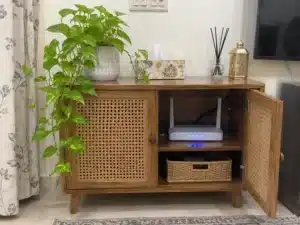
Storage cabinets are another popular option for hiding routers and modems, especially in modern living rooms. A stylish cabinet can conceal your internet equipment, cables, and other accessories while also giving you extra storage space.
But not every cabinet is a good place for a Wi-Fi router. Solid wooden doors, metal panels, and enclosed compartments may weaken wireless signals. Poor airflow can also cause the equipment to run hotter than it should. That’s where wicker and cane-front cabinets become interesting.
Their decorative woven surfaces can make electronic equipment less noticeable without requiring you to hide everything behind a solid panel. Still, the small openings in a cane door don’t automatically guarantee strong Wi-Fi or proper ventilation.
For the best results, look for a cabinet with an open or ventilated back, enough room around the device, and a relatively open front.
I’d also avoid placing the router beside other heat-producing electronics inside the same cramped compartment. You can position the cabinet in your living room, hallway, or entertainment area, but remember that location matters. A beautiful cabinet in the farthest corner of your house won’t do much good if your Wi-Fi struggles to reach the bedrooms.
7. Mount It Under a Table
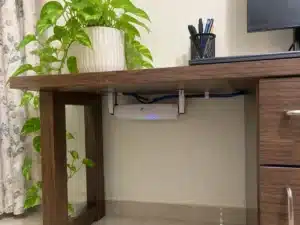
Putting one of the simplest tricks toward the end, mounting a router underneath a table can be a neat way to keep it out of sight. You can use a desk, side table, or another piece of furniture with a suitable underside.
The biggest advantage is that the router doesn’t take up visible shelf space, and you don’t have to build an entire storage box around it. However, I wouldn’t recommend simply flipping your router upside down and attaching it with masking tape.
Not all routers are designed for upside-down mounting, and changing their orientation may affect cooling or antenna performance. Instead, check whether your model supports wall or under-desk installation.
If it does, use an appropriate mounting bracket and follow the manufacturer’s instructions. Make sure there’s enough room around the device for ventilation and that the cables aren’t stretched or sharply bent.
You should also avoid mounting it underneath a metal table or behind a large metal support. This can be a practical solution for home offices and smaller rooms, provided the location doesn’t noticeably weaken your wireless coverage.
What Is the Best Way to Hide a Router and Modem in the Living Room?
The living room is probably where most people struggle with router placement. It’s usually full of furniture, televisions, decorations, and entertainment equipment. Adding a router and a bunch of tangled cables doesn’t exactly help. Fortunately, there are several ways to hide a router in your living room without ruining the overall look.
1. Hide It in a TV Cabinet
A TV cabinet can be a convenient place to keep your internet equipment, especially if you already have a media console. Choose a compartment with an open back or proper ventilation, and avoid placing the router directly behind a large television or inside a metal enclosure. If the cabinet has solid doors, test the Wi-Fi signal before deciding to keep the router there permanently.
2. Place It on Top of a Bookshelf
This is one of my favorite options for keeping things simple. A bookshelf provides an elevated position and gives you plenty of ways to make the router less noticeable. You can place a few decorative objects nearby without completely enclosing the device. It’s especially useful when the bookshelf is located toward the center of the house.
3. Put It in a Woven Basket
If you prefer a cozy or minimalist interior, a ventilated woven basket can fit nicely into the decoration. Choose a basket large enough for your equipment and place it on an open shelf or side table. Just make sure it doesn’t have a thick liner covering the router’s ventilation openings.
4. Hide It Near the TV, Not Directly Behind It
Hiding a router behind the television might seem like the perfect solution. After all, nobody can see it, and the cables are already nearby. But televisions and surrounding electronic equipment can interfere with Wi-Fi coverage, and the large screen may act as an obstruction. If possible, position the router beside the TV or on a separate open shelf instead. It’s a small adjustment that can make a difference.
How to Hide a Modem and Router on the Floor?
Sometimes, placing your router on the floor seems unavoidable. Maybe your internet connection enters the house near the floor, or your cables simply aren’t long enough to reach a shelf.
While you can hide a modem or router at floor level, it’s generally not the ideal location for Wi-Fi coverage. Furniture, walls, and other household objects can interfere with the signal. Dust and accidental spills are also worth considering. If you have no other option, here are two ways to keep the setup tidy.
1. Using a Woven Basket on the Floor
A ventilated basket can conceal the router and cables without making the area look messy. Choose a dry location away from foot traffic, pets, and cleaning equipment. If possible, place the basket on a small stand rather than directly on the floor.
2. Using a Cable Organizer Box
A cable organizer can help keep loose wires and power adapters from spreading across the room. However, you should avoid stuffing everything into a sealed box. Keep power adapters and cables arranged safely, and make sure the router has enough room for ventilation. If your connection allows it, moving the router onto a nearby table or wall shelf is usually a better long-term solution.
Tips on Hiding Router Cables and Blinking Lights
Now that we’ve covered different ways to hide routers and modems, let’s talk about the other things that make these devices so noticeable. Yes, I’m talking about those tangled cables and constantly blinking lights. Sometimes, cleaning up the wiring makes an even bigger difference than hiding the router itself. Here are a few easy tricks.
1. Light Blocking Stickers
Router indicator lights are useful when you need to check your connection, but they can also be distracting, especially at night. Light-dimming stickers are an inexpensive solution. They’re available in different levels of transparency, so you can reduce the brightness without completely hiding the indicators. I’d recommend using removable stickers rather than anything permanent. And don’t cover ventilation holes, reset buttons, or other important parts of the device.
2. Spiral Cable Wraps
If you have several visible cables running from your router, spiral cable wraps can help make them look more organized. These flexible wraps gather multiple cords together, reducing the appearance of a tangled mess. They come in different colors and sizes, so finding something that matches your furniture shouldn’t be difficult. Just avoid wrapping cables too tightly or forcing them into sharp bends, particularly fiber-optic cables.
3. Cable Raceways and Wall Covers
If your router is positioned away from the power outlet, you might have cables running across a wall. That’s where cable raceways come in handy. These narrow covers attach to the wall and conceal cables inside a tidy channel. You can even paint some models to match the wall color. It’s a much cleaner alternative to leaving loose wires hanging down from a shelf.
4. Hide Cables Behind Furniture
Another easy trick is routing cables behind your console table, bookshelf, or entertainment center. Use removable cable clips to guide the wires along the back of the furniture. This keeps everything organized while still allowing you to access the cables when necessary.
If you’re planning to conceal cables inside a wall, make sure the cables and installation method meet applicable electrical and building requirements. Don’t simply cover ordinary power cords with wallpaper or bury them in a wall.
Things to Avoid When Hiding Your Wi-Fi Router
A router might be small, but where you put it can affect how well your internet works throughout the house. Before choosing a hiding spot, there are a few common mistakes worth avoiding.
Don’t put your router inside a metal cabinet. Metal can significantly weaken or block Wi-Fi signals, which may lead to slower speeds and connection problems.
Avoid completely enclosed spaces. Routers generate heat during normal operation. Keeping one inside a cramped, unventilated compartment can cause overheating.
Don’t cover the router with fabric. Table runners, towels, and decorative cloth might hide the device, but they can also trap heat and block ventilation openings.
Keep it away from water and excess humidity. Kitchens, bathrooms, and areas near sinks aren’t ideal locations for electronic equipment.
Don’t hide it too far from the center of your home. A router tucked away in a distant corner may struggle to provide consistent coverage throughout the house. The best hiding spot is one that keeps your equipment discreet without compromising its performance or safety.
How to Check If Hiding Your Router Affects Wi-Fi Signal
Here’s something I recommend doing before you settle on a permanent hiding spot. You might find a decorative box that looks perfect, but that doesn’t necessarily mean it’s a good place for your router.
Start by checking your Wi-Fi performance while the router is in its original, open location. Then move it to your chosen hiding spot and run the same test.
For a more useful comparison, try these steps:
-
Connect your phone or laptop to the same Wi-Fi network.
-
Run an internet speed test in the same room.
-
Check the connection in a bedroom or another area farther away.
-
Place the router in its new location and repeat the tests.
-
Compare speeds, signal strength, and connection stability.
Try to keep the testing conditions similar, since network congestion and other factors can affect the results. If you notice noticeably slower speeds or weaker coverage after hiding the router, try moving it a little or choosing a more open location. Sometimes, moving the router just a short distance away from an obstruction can improve the connection.
Frequently Asked Questions
Can You Hide a Wi-Fi Router Without Blocking the Signal?
Yes, you can hide a Wi-Fi router without significantly weakening its signal, as long as you choose the right location and materials. Open shelves, ventilated organizers, and decorative furniture can conceal the router while allowing wireless signals to travel relatively freely. Avoid metal enclosures, thick barriers, and tightly closed containers.
Does Putting a Router in a Wooden Box Affect Wi-Fi?
A wooden box can affect Wi-Fi performance depending on the thickness of the wood, its moisture content, and how enclosed the box is. Thin, dry wooden materials may have less impact than metal, but they aren’t completely invisible to Wi-Fi signals. Make sure the box is well-ventilated and test your connection after placing the router inside.
Can I Put My Router Behind the TV?
You can, but it’s not always the best idea. A large television can obstruct wireless signals, particularly if the router is positioned directly behind it. If possible, place the router beside the television or on a nearby open shelf instead.
Is It Safe to Keep a Router Inside a Cabinet?
It can be safe if the cabinet has sufficient ventilation and the placement follows the router manufacturer’s instructions. Avoid tightly enclosed spaces, blocked ventilation openings, and cabinets that contain several heat-producing devices. Also, remember that a cabinet may weaken Wi-Fi coverage even when overheating isn’t an issue.
Where Should I Place My Router for the Best Wi-Fi Signal?
For most homes, a relatively central, elevated, and open location provides better Wi-Fi coverage. Try to keep your router away from large metal objects, thick walls, and unnecessary obstructions. If you have a larger home, a mesh Wi-Fi system or additional access point may help cover areas that are difficult to reach.
Wrapping Up
That concludes my favorite ideas on how to hide a router and modem without blocking the signal. As you can see, you don’t need to spend a fortune or completely rearrange your living room to keep these devices out of sight. Whether you choose a wall-mounted shelf, decorative basket, cable organizer, or storage cabinet, there are plenty of ways to make your internet equipment blend into your home’s decor.
Personally, I’d start with the simplest option, such as placing the router on an open bookshelf or using a well-ventilated organizer. These approaches make it easier to maintain airflow and check the equipment whenever necessary.
Just remember that hiding your router shouldn’t come at the expense of your Wi-Fi connection. Keep the device in a relatively open location, avoid materials that interfere with wireless signals, and make sure there’s enough ventilation to prevent heat buildup.
With a little creativity and the right placement, you can enjoy a cleaner-looking home without giving up the reliable internet connection you need.