
The Netgear Nighthawk M7 5G and Nighthawk M6 Pro take different routes to fast mobile internet. The M7 brings WiFi 7 and built-in eSIM support, while the M6 Pro combines WiFi 6E with 5G mmWave and a wired Ethernet option. Both are aimed at people who need more dependable connectivity than a phone hotspot can provide, but the better fit depends on your carrier, travel habits, and whether you need to connect the device to a home or office network.
Netgear Nighthawk M7 5G Vs Netgear Nighthawk M6 Pro
⚡ Quick Verdict
I would choose the Nighthawk M7 for WiFi 7, simpler international plan activation, and a mobile-first setup. The M6 Pro is the stronger pick if you need Verizon certification, 5G mmWave, or Ethernet. The M7 gets the overall nod for newer wireless technology, while the M6 Pro makes a stronger case for hybrid home-and-travel use.
Analysis: NETGEAR Nighthawk M7 5G
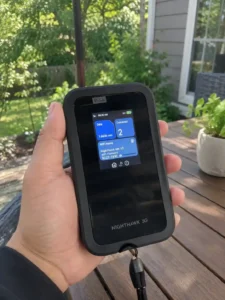
The M7 makes the most sense for travelers and tech-focused users who want newer wireless standards without carrying a separate modem and router. Its eSIM support is particularly useful for international trips, while the unlocked design leaves room to use compatible carriers. I would look closely at your carrier and local coverage before assuming its headline speeds will translate directly to everyday use.
WiFi 7 is the M7’s main advantage, with advertised wireless speeds of up to 3.6 Gbps. That newer standard can improve efficiency and responsiveness when several devices are sharing the connection. The hotspot can use either 5G or 4G, but actual results will still depend on the carrier network, signal strength, location, and connected devices.
The built-in NETGEAR eSIM makes the M7 convenient for travel. Through the Nighthawk app, you can purchase 5G or 4G data plans in more than 140 countries without signing a long-term contract. In the US, the device is certified for AT&T and T-Mobile and is unlocked for other compatible carriers; local eSIM or SIM activation details still need to be confirmed with the carrier.
Build Quality & Design
The M7 is shaped for travel, with a compact form that should fit easily in a pocket, backpack, or laptop bag. Its status information is designed to be easy to check while you are moving between networks. As with any portable hotspot, its real-world durability will depend on how it is carried and handled.
Performance & Speed
WiFi 7 gives the M7 a newer foundation than the M6 Pro’s WiFi 6E system. NETGEAR lists speeds of up to 3.6 Gbps, and features such as Multi-Link Operation can help with responsiveness and connection efficiency when the surrounding network and client devices support them. The cellular signal remains the biggest variable, so the advertised maximum should be treated as a best-case figure.
Features & Functionality
The integrated eSIM is the feature that most clearly separates the M7 from the M6 Pro. It lets travelers arrange compatible data plans without repeatedly removing and replacing a physical SIM. The hotspot can support up to 32 connected devices and includes security features such as WPA3 and firewall protection, making it suitable for work groups as well as personal devices.
User Experience
The Nighthawk app brings connection settings, data-plan management, and usage monitoring into one place. eSIM activation should be less fiddly than changing physical SIM cards, especially when crossing borders. A dedicated hotspot also keeps tethering work off your phone, which can be useful during long workdays or travel.
Value for Money
The M7’s value comes from combining WiFi 7 with a convenient international connectivity option. That combination is most compelling for frequent travelers or users planning to keep the device for several years. The case is weaker if your current devices do not benefit from WiFi 7 or if your preferred carrier is outside the model’s confirmed compatibility.
✅ Advantages
❌ Disadvantages
Analysis: NETGEAR Nighthawk M6 Pro
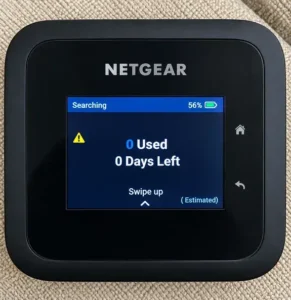
The M6 Pro is the more flexible choice when a hotspot needs to cover both travel and a fixed workspace. It supports AT&T, T-Mobile, and Verizon, adds 5G mmWave capability, and includes Ethernet for wired equipment. I would favor it over the M7 when those practical connections matter more than having the newest WiFi generation.
The M6 Pro uses WiFi 6E and supports 5G mmWave, with an advertised cellular speed of up to 8 Gbps. That figure is mainly relevant where mmWave coverage is available, but it gives the M6 Pro a higher theoretical ceiling than the M7. Its unlocked design and certification for AT&T, T-Mobile, and Verizon also make it easier to match with major US networks.
This hotspot can work as more than a travel accessory. Its Ethernet port allows a wired connection for compatible stationary equipment, making it useful as a home internet option or backup connection. It works in more than 125 countries and accepts activated physical data SIM cards, so changing plans is straightforward even if it is less convenient than using an eSIM.
Build Quality & Design
The M6 Pro has a sturdy, travel-friendly design, with a slightly larger body that accommodates its Ethernet connection. Its color touchscreen gives you a direct way to check the network and adjust basic settings. That combination makes the device feel equally suited to a hotel room, a work bag, or a fixed backup setup.
Performance & Speed
WiFi 6E gives the M6 Pro access to the less congested 6GHz band when compatible devices and local conditions support it. The bigger headline is 5G mmWave, which can reach up to 8 Gbps in supported areas. Outside mmWave coverage, performance will depend on the available 5G or 4G network rather than the peak figure on the box.
Features & Functionality
The M6 Pro’s appeal is its range of connection options. It supports up to 32 devices, can share a mobile connection over WiFi, and includes a 2.5Gbps Ethernet port for wired equipment such as a desktop computer or smart TV. Verizon certification adds another useful advantage for US buyers who want to keep their carrier options open.
User Experience
The color touchscreen makes common checks, such as data usage and connection status, easy to handle without opening the app. Swapping a physical SIM is simple, though it is less seamless than the M7’s eSIM approach when changing international plans. The Nighthawk app remains available for remote management, and the Ethernet connection can make the M6 Pro quick to deploy as a home backup.
Value for Money
The M6 Pro earns its value by serving two roles: portable hotspot and wired internet source. That flexibility is meaningful if you would otherwise buy separate equipment for travel and backup connectivity. WiFi 6E is not the newest standard, but it remains capable for current devices, especially when Verizon support, mmWave, or Ethernet is part of the brief.
✅ Advantages
❌ Disadvantages
Major Factors to Consider
The decision comes down to how you expect to use the hotspot. I would weigh the WiFi generation and travel setup first, then check carrier certification and whether a wired connection matters. Peak speed figures are useful for understanding each device’s ceiling, but local coverage and signal quality will have more say in day-to-day performance.
Performance
The M7 has the newer WiFi 7 standard, which can improve efficiency and latency with compatible devices. The M6 Pro counters with 5G mmWave and a higher advertised cellular ceiling of up to 8 Gbps. In practice, the carrier network, signal strength, location, and number of connected devices will determine which one feels faster.
Speed & Efficiency
The M7’s WiFi 7 features, including Multi-Link Operation, are aimed at keeping connections responsive as traffic changes. The M6 Pro has the stronger peak-speed headline through mmWave, but that advantage depends on finding mmWave coverage. My read is that the M7 has the newer efficiency story, while the M6 Pro has the higher best-case speed.
Price & Value
No visible prices are provided here, so I would not claim a specific price advantage. The M7 earns its case through WiFi 7 and eSIM convenience, while the M6 Pro adds value through Ethernet, mmWave, and broader listed US carrier certification. The right value calculation depends on which of those features you would actually use.
Build Quality
Both models are designed as premium portable Nighthawk hotspots. The M7 emphasizes a compact mobile form, while the M6 Pro uses a slightly larger design to accommodate Ethernet. Both include direct ways to monitor the connection, making them suitable for travel and mobile work.
Design & Aesthetics
The M7’s design is centered on portability and a newer wireless feature set. The M6 Pro looks more like a hybrid travel-and-home device because its port selection supports a fixed setup as well as WiFi connections. The practical distinction matters more than the styling: choose based on where the hotspot will live and what it needs to connect to.
Durability
Both devices are intended to travel in bags, vehicles, and workspaces, so handling and battery care will affect their long-term life. The M7’s smaller profile may be easier to carry, while the M6 Pro’s larger body makes room for its wired connection. The available listing details do not establish a tested durability advantage for either model.
Feature Comparison
The table below brings the main differences into one view. The M7 is the wireless-forward option, with WiFi 7 and eSIM at the center of its appeal. The M6 Pro leans into flexibility, adding mmWave, Ethernet, and explicit support for three major US carriers.
| Feature | NETGEAR Nighthawk M7 5G | NETGEAR Nighthawk M6 Pro |
|---|---|---|
| WiFi 7 Support | ✓ | ✗ |
| WiFi 6E Support | ✗ | ✓ |
| eSIM Technology | ✓ | ✗ |
| 5G mmWave Support | ✗ | ✓ |
| Ethernet Port | ✗ | ✓ |
| Verizon Certified | ✗ | ✓ |
| AT&T Certified | ✓ | ✓ |
| T-Mobile Certified | ✓ | ✓ |
| Connect 32 Devices | ✓ | ✓ |
| WPA3 Security | ✓ | ✓ |
Specifications Comparison
The specifications clarify where each hotspot has an edge. The M7 offers WiFi 7 and coverage across more than 140 countries, while the M6 Pro lists faster peak cellular speeds, WiFi 6E, mmWave, and a 2.5Gbps Ethernet connection. Use those figures as a guide, but keep local carrier coverage and signal conditions in mind.
| Specification | NETGEAR Nighthawk M7 5G | NETGEAR Nighthawk M6 Pro |
|---|---|---|
| WiFi Standard | WiFi 7 | WiFi 6E |
| Max WiFi Speed | 3.6 Gbps | 8 Gbps |
| SIM Type | eSIM + Nano | Nano-SIM |
| Ethernet Port | None | 2.5Gbps |
| Max Devices | 32 | 32 |
| Global Countries | 140+ | 125 |
| US Carriers | AT&T, T-Mobile | AT&T, T-Mobile, Verizon |
| Security | WPA3 | WPA3 |
🏆 Winner: NETGEAR Nighthawk M7 5G
Score Breakdown
I would give the overall win to the Nighthawk M7 because WiFi 7 and built-in eSIM support make it the more modern mobile hotspot. It is the cleaner choice for frequent travelers who want simple plan management and newer wireless capability. The M6 Pro is the better specialist option when Ethernet, Verizon certification, or mmWave matters more than moving to WiFi 7.
Choose NETGEAR Nighthawk M6 Pro If…
Budget-Conscious Buyers
Choose the M6 Pro if you want one device to cover travel, home internet, and backup duty. Its Ethernet port and mmWave support give it more potential in a fixed setup, while it still works as a portable hotspot.
Specific Use Case
The M6 Pro is the better fit when your workflow requires Ethernet. A desktop computer, smart TV, or other wired device can connect directly instead of relying on WiFi, and you can still take the hotspot on the road.
Preference Scenario
I would select the M6 Pro for Verizon service because the listing explicitly identifies it as certified for Verizon, alongside AT&T and T-Mobile. Confirm the current plan and coverage details with the carrier before buying.
Value Seekers
Pick the M6 Pro if you would rather have a mature WiFi 6E platform with broad carrier support and physical connection options than pay for the newest WiFi standard. It still offers strong 5G capabilities, but without the M7’s eSIM convenience.
🎯 Final Recommendation
Buy the Nighthawk M7 if your priority is a mobile-first hotspot with WiFi 7 and easy international eSIM management. Choose the Nighthawk M6 Pro if you need Ethernet, Verizon support, or the highest advertised cellular speed through mmWave. The M7 is the better overall choice for forward-looking travel use; the M6 Pro is more adaptable as a combined mobile and home connection.
Summary
- The M7 uses WiFi 7, giving it the newer wireless foundation and the potential for better efficiency when several compatible devices share the connection.
- Its built-in eSIM supports plan purchases through the Nighthawk app in more than 140 countries, so international travel does not require repeated physical SIM swaps.
- The M6 Pro combines 5G mmWave with a 2.5Gbps Ethernet port, making it especially useful for home backup, wired equipment, or a fixed workspace.
- Verizon users have a clearer compatibility case with the M6 Pro because its listing explicitly names Verizon certification.
- Both hotspots support up to 32 connected devices and offer a more dedicated connectivity setup than relying on a phone’s battery and tethering feature.
- The M7 wins on WiFi generation and eSIM convenience, while the M6 Pro remains the more flexible choice for Ethernet, mmWave, and broader listed US carrier support.
Pingback: How To Choose A 5g Modem: 5 Steps That Work